Showing posts with label blogging tips. Show all posts

Saturday, 20 October 2012

Negative Impact of Using Auto Ping Widget

Some of the bloggers would have wanted his blog ping too quickly on search engines, with the services of several websites ping ping its course.

and there was a negative impact of using widgets Auto Ping, is:

1. Visitors will often click the Auto Ping Widget, its result would be to ping your blog. And if the visitor clicks a little, it means it's okay, but if the clicking Thousands, wah. Definitely a blog you will automatically terdelete of Search Search Engine.
why??
Because Google blog Assuming you have a disorder that causes excessive pinging, or be referred to ping spam.

Therefore, we should avoid the use of widgets such as Auto Ping Ping.

His best, you can use a service like Ping Pingomatic.com , because Ping-O-Matic is its Ping Services Could do with him BookMark page. His way is if you have to ping on the web, be sure it says "Ping Ping Sent which means you've Sent, and immediately Bookmark this page if you want to do the Ping Again, Live search page you bookmark and visit

your comment means a lot to us

Wednesday, 5 September 2012

another site that pay like adsense


FOR ADVERTISER
SpeedyAds Advertiser automatically adjust your Cost Per Click at $0.01 above the next closest competitor, so you get the best possible price for your traffic. It is Easily create and edit your ads and target URL. Simply choose a title, a line of description and you are set to go. Your ads will start appear in our network within minutes.you can register here for speedyads here 

FOR PUBLISHER
You get paid for every visitor that clicks on an ad. there goal is to enable you to make as much as possible from your advertising space, by letting advertisers bid on your ad space.
Generate detailed online reports, including the number of page impressions, clicks, click-through rate, traffic origin and the total amount you've earned.
It enables you to choose from different ad formats, including banners, towers, squares and more. Select the color scheme and appearance to fit your site's design completely. also speedyads is also good for publisher it is very easy to gey you ads code and to set it up.you can register here for speedyads here

Friday, 31 August 2012

how to check your website page loading

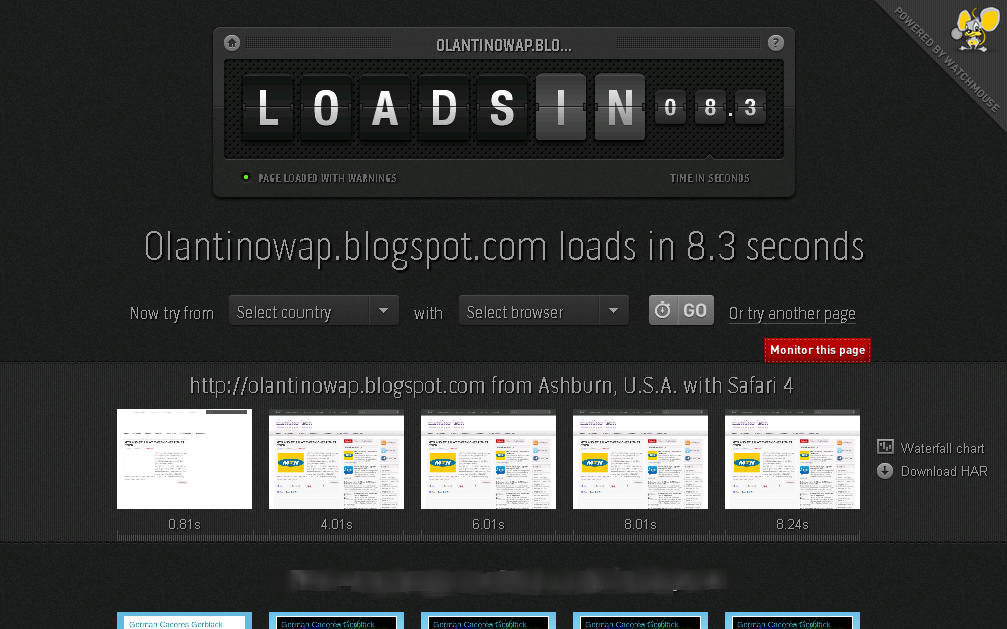
now you can check your website page loading to know the actually seconds or minute it take to load a page on your website you can check it here the listed below website
LIST 
www.webpagetest.org/
www.tools.pingdom.com/fpt/
www.loads.in/

all the websit below allow you to check the loading of your website the second it take to load may be you site is very slow or fast it will show itso that you can make changes on it also so that your guest will not be running from your site
my site


REASON FOR A WEBSITE TO LOAD SLOWLY
1. high quality of image
2.too much of advert banners
3.too much of widgets
after you have done all this on your website now go back to the listed below link where you can check it
if you have any comment kindly post it or their is something you want us to attach that is not there kindly post it at the comment box
HAPPY VISITING


Friday, 10 August 2012

How To Add Reply Option To blogger Comment

WOW!!! This is cool option for your blogger. You can add reply button
to your every blogger comment. so it will help you to reply
to questions easily.

 1. Log in to your blogger account and Go to Design >> Edit HTML

2. Make sure you put check mark to “Expand Widget Templates

3. Find this tag by using Ctrl+F  <data:commentPostedByMsg/> 

4. Paste  below code After  <data:commentPostedByMsg/> code

<span><a expr:href='&quot;https://www.blogger.com/comment.g?blogID=YOUR-BLOG-ID&amp;postID=&quot; + data:post.id + &quot;&amp;
isPopup=true&amp;postBody=%40%3C%61%20%68%72%65%66%3D%22%23&quot; + data:comment.anchorName + &quot;%22%3E&quot; + data:comment.author + &quot;%3C%2F%61%3E#form&quot;'
 onclick='javascript:window.open(this.href, &quot;bloggerPopup&quot;, &quot;toolbar=0,location=0,statusbar=1,menubar=0,scrollbars=yes,width=450,height=450&quot;); return false;'>
<img alt='Reply To This Comment' src='https://blogger.googleusercontent.com/img/b/R29vZ2xl/AVvXsEisLVfmdXpEyGigPfUnkShTVlX7aMQdR0__uHBJAo_aC-kD3wA1oG-MzhEFVAKEj6fjjHWaPk7-f2-0tObcb0iUzcCBnadSaJwmH4l1_m5UJCN5dFt8XdRbSqpsVYIo2Th-pO_-gFLkvJLa/s1600/reply.png'/></a></span>

 You can replace YOUR-BLOG-ID with your ID

Go to dashboard and click design, then you can get your blog ID on Address bar.
It looks like below.
5. then After you finish, you can click Save Template
   You are done. 

Saturday, 14 July 2012

Top 7 Blogging Tips to Increase Traffic to you Blog Posts


7295036434 08f3f82560 Top 7 Blogging Tips to Increase Traffic to you Blog Posts
  1. Update your profile. Before you start posting on your blog, make sure that you have an updated profile. Include information that you want to share with your readers, your background and the like. Providing this information will help you gain your readers’ trust and will help in establishing a better relationship with them.
  2. Use catchy phrases for your Post Title and opening paragraphs. In order to attract readers to check out your post, you have to use catchy titles that will attract the attention of your viewers. The first few paragraphs should also be interesting to make your viewers read your post till the end.
  3. Write relevant topics that will be helpful to your readers. Your readers will keep coming back to your blog if you publish important information that they may find useful. You can post current news and trends, how tos, tips and tricks and more where your readers can gain valuable knowledge from.
  4. Add images and videos to your post. Attractive pictures and videos can add to the interest of your readers and will help convey the message of your post better.
  5. Interact with other bloggers in the same niche. Subscribe to the RSS feeds or sign up to email subscription of other blogs in the same category as your site and leave meaningful comments. By doing this, you are making yourself known in the blogsphere and can help connect to other bloggers, which in turn, will visit your site and leave comments on your post.
  6. Try Guest Posting. Guest posting is one link building strategy that can help drive traffic to your site. In guest posting, you contact other blog owners in the same niche to post an article, your guest post, in exchange to a link to your site. Doing this is one way of expanding your readership as you are promoting your site to readers of other blogs with the same niche as yours.
  7. Add social media links to your post. Links for Facebook, Twitter, StumbleUpon, Google+ and more can be added to each of your post so your readers can easily share the article in these various social networking sites just by clicking the link. This will even expand your readership, as we all know how powerful social media is in promoting a site and reaching larger audience.
Following the tips mentioned above is a sure way to fire up traffic to your posts and will ultimately help in improving the ranking of your blog or site.

leave a comment down there

Friday, 13 July 2012

how to add a site map table to your blog

 GET THE "PLAIN" TABLE OF CONTENT CODE:

  1. <span style="font-family: 'Courier New', Courier, monospace;"><script src="http://francel200.xtgem.com/bloggerwidgets/sitemaptable.js">  
  2. </script>  
  3. <script src="http://olantinowap.blogspot.com/feeds/posts/default?max-results=9999&alt=json-in-script&callback=loadtoc">  
  4. </script></span> 
HOW TO ADD INTO YOUR BLOGGER?
Heres How?
  • Log in to your Blogger Account.
  • Go to Dashboard
  • Then Posting > Edit Pages > New Page 
  • Then Publish see your sitemap link in your Pages.


Hope you like it my post you can subscribe to my fan page or feeds to receive updates. 
follow us on  twitter facebook 

Monday, 9 July 2012

Keyword Search Optimization Advice For Bloggers

if you’re blogging then you will almost certainly have heard about keyword search optimization. There are many ways to get traffic to your blog, but the best free method is to appear in the search engines for relevant keywords. Searchers will then click through to your blog to find what you’re looking for.
Although the search engines may include your site in results when you take advantage of keyword search optimization or not, you can give them a helping hand. By doing keyword research, finding highly searched keywords, and then using them appropriately in your content, you can make sure that the search engines rank you higher for these terms.
Keyword Density
 When writing using keywords, the number of times you include a given keyword throughout the content is known as “keyword density”. For example, if your blog post is 400 words long and contains 4 instances of the keyword, this means that you’ve got a 1% keyword density (one instance of the keyword per 100 words). There is debate about how much you should use the keywords, but it’s often recommended you use them at least once per 100 words.
Where you use the keywords is also important. You should include them:
* At the beginning of the title,
* Within the first sentence,
* Within the last sentence,
* And spread through the article body.
 Keep It Natural
 Although keyword search optimization is an important strategy for many bloggers, it’s also important to sound natural. After all, it’s not just the search engines looking at your content – there are real human readers too! And they’re likely to be turned off if it sounds like you’ve just stuffed in your keyword as many times as possible.
This is why it’s important to work on writing a good blog post first, and worry about the keywords you’re including second. No matter how well you’ve incorporated keyword search optimization into your article, your site isn’t going to do well unless you can keep readers interested with well crafted, interesting content that’s written with their needs in mind.
Too Many Keywords Can Have The Opposite Effect
 Although we all know that it’s useful to include keywords in your blog posts, including too many can even turn the search engines off. The giants like Google are well aware that bloggers and internet marketers are trying to improve their rankings with methods like this, so they won’t reward you for taking shortcuts and stuffing your content with too many keywords. If they did, it would be too easy for low quality rankings to get to the top of the rankings.
Keywords Aren’t Everything
 Following on from the point above, it’s important to realize that Google is looking at a lot more than just keywords to rank your site. It takes into account who links back to your site, how you link to your own pages, how well your site is laid out and, importantly, whether your website actually delivers the information your visitors are searching for.
Keyword search optimization is definitely something you should be incorporating into your blog posts if you want to take advantage of free search engine traffic. However, it’s also important to work on the quality of your blog. The visitors will follow. 

YOU CAN SHARE THIS POST OR COMMENT

Monday, 2 July 2012

Add Description to images for more blog traffic

Images are very essential thing for every post of your blog, and they'll attract your blog's visitors and forces them to read the article, likewise do you ever thought of adding search description for images ? , it will bring more traffic for your blog via images search in search engines. So I'm going to share this interesting thing, on how to add search description for images.This is a very simple trick but, It'll surely increases your blog's traffic.As Images, play an important role in increasing your blog's traffic, it is must to add at-least a single image in your post.
Search description for images
Adding Search Description to Images
I strongly recommend to use Flickr, for this trick. And here is the tutorial
  • First Login to Flickr or if you don't have an account then create an account
  • Upload the image into Flickr, which you want to use it for your Post
  • And Edit the Title [ Name of the Image ] of the image and add the description to that image
  • Then Save it and upload the image to Flickr
  • And then Download that Image from Flickr to your PC, and the insert it into the Post

How it Works ?

Then, after publishing you article, after an hour search the image that you inserted into the post with the title of your image. There you can find the image that you inserted in your article, with the Description that you entered in Flickr. Want to see the search description's demo in live action ?, Have look below image, of SEOMOZ
SEOMOZ blog's image description
 I too use Flickr, for adding Search description to images, and I'm getting 56 visits for my blog per day via Google image search results. I hope you too will be using this trick to add search description to your images. And in WordPress there are some Plugins to add search description for images, for those they'll not work out this trick, as they already have an plugin for search description, But sometimes It doesn't works , So it is good to add Search description to images in Flickr and as well as in WordPress.

An Important Note:
Search engines [ Image search engines or Like Google image search results ] always rank your images based on the quality of your article and Length of your article, and Popularity of your blog. And an another point, is try to add at-least a single image in your post, as I already mentioned above, it will attract your readers and forces them to click the post title and read the post from your blog's homepage. This is just an normal advice, it is up to you, whether to follow or not.

I Hope this tutorial will be helpful!

If you found this article useful Kindly take 5 seconds to share this article!

Monday, 25 June 2012

Tips to help you increase your page rank

Today I am going to write about Page Ranks, what page rank is all about, how to increase your page rank and importance of page ranks. So without wasting our time, let’s get started with it.
What is page rank?  Google uses page rank to determine the importance of a web page and also how it is used to determine which page appears in search results. Page rank is an algorithm used by Google to determine the importance of a web page by the number of links (back-links) it has.  If a web page has so many links pointing to it that means its content is of great importance to so many people.  So when someone searches for a keyword, Google uses the page rank to determine the web pages to show in the search result. So Google uses numerical values between 0 to 10 to rank web pages according to its importance.
How to increase page rank: I want to keep this post as simple as possible so as not to bore you. So I am going to list some important steps you could take to ensure increased page rank.
Unique contents: First is to Post unique contents on your blog always, blogging should be an everyday affair, so always strive to add unique contents to your blog because if your blog has important contents you are sure your visitors will always return to your site again to read more important blog posts.
Inside linking: Next is linking your blog posts, create an inside linking to your site, link your older blog posts with recent ones so that a visitor can visit an older posts from a recent one. You can also use plugins like recent posts, random, related posts plugins to create inside linking in your blog.
Meta keywords: Use of Meta keywords tags in your blog is also a very important factor as this will help search engines figure out what your blog is all about.
Sitemap: I use the WordPress Sitemap plugin to generate sitemap in my blogs, ensure to use such plugins to create sitemaps as this will be easier for Google to index your links. Look at my sitemap at the top navigation bar to see how my links are listed.
Link exchange: Exchanging links with other blog owners is also important, you can use your blogroll to exchange links with other bloggers. Link exchange is a fast way to improve your blog’s visibility in search engines. Try and link with site/blogs with higher page ranks.
Submit your site to various web directories and reference sites: Submit your site to popular web directories like Open Directory Project (ODP), Yahoo, Google, Looksmart. Guest write for popular sites and blogs as this will give you a chance to link back to your site.
Comment on other blogs: learn to give useful comments on other websites as this will also give you a chance to link back to your blog.
Social Networking: Use the social networking sites to promote posts as this is a sure way of generating traffic to your blog. Use Facebook, Twitter, Google +, StumbleUpon etc to promote your posts.


You can check your Page ranks here. You should also Subscribe to olantinowap Feeds by Email for more important posts like this one.

How to convert blog post/blog/website to PDF..

How to convert blog post/blog/website to PDF..


With the use of this tutorial you will easily be able to refer to any blog post/Blog/Website to PDF.

In this tutorial you will be able to easily convert the Blog Post/Blog/Website to PDF.

1. Simply visit http://pdfmyurl.com/
2. Paste the b of the blog that you want to be converted.
3. Then, click the button P on the bottom left corner.
4. That it! You will get your PDF.

Sunday, 24 June 2012

Improve Your Blogs Google Rank With Meta Tags And Meta Description


In this post i will show you how to add Meta Tags And Meta Description to your blog.Improving your search engine rank is key to the success of your blog.This is known as S.E.O. (Search Engine Optimization).

Large companies spend a fortune on S.E.O. ,That's great if you have a fortune to spend ! Search engines use automated spiders and crawlers, to collect information from your blog.They collect URL'S ,Titles,etc...
They also collect keywords from the early parts of your blog posts.

However you don't know which words are taken as keywords connected to your blog, It's likely the keywords been taken are not relevent to your blog at all. In this case your blog won't be indexed properly in search engines.

Theres also a chance your highly relevant keywords might not even be used to index your blog.This will result in your blog being ranked behind Thousands of others in searches !

But you can take control !

You can add Meta Tags and Description to your blog.

Now YOUR telling the search engine spiders and crawlers the key words and description YOU want your blog to be indexed under.

So lets do it !

First you must copy the code below and add a meta description and meta keywords (as shown in bold) as follows:


<meta content='text/html; charset=utf-8' http-equiv='Content-Type'/>
<meta content='PUT BLOG DISCRIPTION HERE.' name='description'/>
<meta content='PUT, KEYWORDS, HERE, SEPERATED, BY, COMMA,' name='keywords'/>

Heres an example of how the code might look for this blog:

<meta content='text/html; charset=utf-8' http-equiv='Content-Type'/>
<meta content='OLANTINO BLOG TIPS TRICKS' name='description'/>
<meta content='blog, tips, tricks,' name='keywords'/>

Notes on Description:'PUT BLOG DISCRIPTION HERE'.- TRY KEEP IT LESS THAN 150 CHARACTERS

This explains its self,Keeping it under 150 characters is search engine friendly,you don't have to use 150 characters it can be as short or long as you wish once its relevant to your blog.

Notes on Keywords :'PUT, KEYWORDS, HERE, SEPERATED, BY, COMMA,'-YOU CAN ADD AS MANY AS YOU LIKE - SEPARATE BY COMMAS - DON'T USE THE SAME WORD MORE THAN 5 TIMES

-Think which words or phrases best describe your blog.Repeating a word more than 5 times can be seen as spam by search engines.

Adding The Code To Your Blog :

1.Click 'Design'-->'Edit Html' For your blog.

2.Find the following piece of code in your blogs html:
(Its very close to the top)


<head>

3.Add the meta content code Directly Below <head>

4.Click save and your finished.

In a previous blog i covered Improving S.E.O. by Changing the way Google sees your blog this is also important: Improved Blogger Title Format.Check out more of our SEO Tips

Drop Your Comments And Questions Below