Showing posts with label blogging seo. Show all posts

Saturday, 20 October 2012

Negative Impact of Using Auto Ping Widget

Some of the bloggers would have wanted his blog ping too quickly on search engines, with the services of several websites ping ping its course.

and there was a negative impact of using widgets Auto Ping, is:

1. Visitors will often click the Auto Ping Widget, its result would be to ping your blog. And if the visitor clicks a little, it means it's okay, but if the clicking Thousands, wah. Definitely a blog you will automatically terdelete of Search Search Engine.
why??
Because Google blog Assuming you have a disorder that causes excessive pinging, or be referred to ping spam.

Therefore, we should avoid the use of widgets such as Auto Ping Ping.

His best, you can use a service like Ping Pingomatic.com , because Ping-O-Matic is its Ping Services Could do with him BookMark page. His way is if you have to ping on the web, be sure it says "Ping Ping Sent which means you've Sent, and immediately Bookmark this page if you want to do the Ping Again, Live search page you bookmark and visit

your comment means a lot to us

Saturday, 13 October 2012

How To Increase Blog Pageview


What is Pageview?
Pageview is how many visitors do the walk on your blog, and read some of your great post on your blog

Its definitely you want your blog to increase pageviews.
In the teaching of SEO, Pageview also needed to improve the blog crowd.


in doing business in the blog by posting PPC ads, it must be the blogger wants his blog to get pageviews a lot in order to increase the CPM in its advertising and if I myself were to increase blog pageviews by making useful posts like this.

These Is The Tips To Increase pageview on your blog:
1. Blog Descriptions/Theme. That is a blog concerned with only one subject only, eg his blog SEO tutorials, and blog posts specifically for online business. because visitors will be free turning in his blog article agan because its the same type of blog categories.
2. Linking Related News on Final Post This is almost similar to No. 1 above, but if the blog has a category again much like thisblog, must link the post / related news at the end of the post.
Since visitors are not going to run away as fast as he came across your blog because there is another interesting post to read.
3. BlogWalk Well, if this term would have been familiar to the bloggers. by visiting other people's blogs and comment on blogs that are best for a visit, it may be interesting to visit your blog. Not only that, visitors not only read the blogarticle, but they also want to see the comments / responses someone who read article. And if my friend's comments interesting then the curious visitor to visit the blog the best comment poster.


don't just read and walk away like that
Drop your comments if you love this post

Friday, 31 August 2012

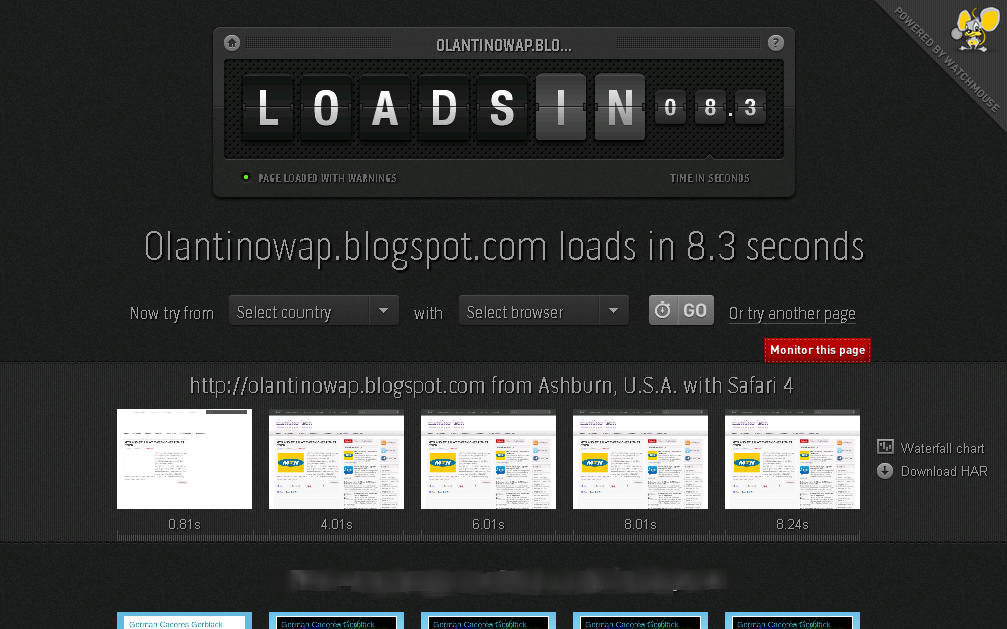
how to check your website page loading

now you can check your website page loading to know the actually seconds or minute it take to load a page on your website you can check it here the listed below website
LIST 
www.webpagetest.org/
www.tools.pingdom.com/fpt/
www.loads.in/

all the websit below allow you to check the loading of your website the second it take to load may be you site is very slow or fast it will show itso that you can make changes on it also so that your guest will not be running from your site
my site


REASON FOR A WEBSITE TO LOAD SLOWLY
1. high quality of image
2.too much of advert banners
3.too much of widgets
after you have done all this on your website now go back to the listed below link where you can check it
if you have any comment kindly post it or their is something you want us to attach that is not there kindly post it at the comment box
HAPPY VISITING


Monday, 6 August 2012

How To Check How Many Backlinks On Your Blog


Backlinks, also known as incoming links, inbound links, inlinks, and inward links, are incoming links to a website or web page. In basic link terminology, a backlink is any link received by a web node (web page, directory, website, or top level domain) from another web node.

Inbound links were originally important (prior to the emergence of search engines) as a primary means of web navigation; today, their significance lies in search engine optimization (SEO). The number of backlinks is one indication of the popularity or importance of that website or page (for example, this is used by Google to determine the PageRank of a webpage). Outside of SEO, the backlinks of a webpage may be of significant personal, cultural or semantic interest: they indicate who is paying attention to that page.


now You can check your Blog Backlinks using Backlinkwatch visit backlinkwatch.com then type the URL of your blog to get the complete details and information about the quantity and quality of backlinks pointing to your blog.

Tuesday, 24 July 2012

ping your site to get more traffic

this is a tutorial prepare on getting more traffic to your blog,  their is many way you can ping your site to get more traffic but i think this can also help in increasing your blog traffic now visit

visit www.totalping.com
 screenshot below

Click here to view full size 
feel all the box that the screenshot below thanks for visiting and click on make ping you are good to go...
you can share this also and your comment

Thursday, 19 July 2012

How to add Transparent Fixed Follow On Twitter Badge To Blogger

wow this post i have an awesome fully transparent Follow on Twitter image i know you will love.The image has the Twitter bird on a branch with a small Follow Us On Twitter board Below.The image will really catch the eye of visitors to your blog and get more people following your blogs updates on Twitter.We will add the image to the right side of your blog and as i said it will stay fixed in position as the reader scrolls.Lets look at the screenshot or see the live demo at right side of this post.

  • Go to blogger--->Layout--->Add a gadget
  • Choose HTML/Javascript from the list
  • Copy and paste code below into it
<a href='http://gj37765.blogspot.in'><img alt='Tips Tricks And Tutorials' src='https://blogger.googleusercontent.com/img/b/R29vZ2xl/AVvXsEj7lm3z7fUu28_hN8ryxN8mLoG3jPskCtcj22ZXt-9rfIU0ew-s69saR_zUDlqDqEBDHJ19r8R2y1INAhd7bfimtBambo_igXbbCxVgh8ElZPPT-_Qle8K5DWscv4YBHxnnNw067_J0HGaP/s1600/best+blogger+tips.png'/></a><div style='position: fixed; bottom: 20%; right: 0%;'/><a href="http://www.twitter.com/iam_olantino" target="_blank"><img src="https://blogger.googleusercontent.com/img/b/R29vZ2xl/AVvXsEjJ3BMhpBCOyEnAhQiX17FnU-Eh4z09PMuxYJlUy5Rr0tf51DDLWJG1SPxEVeVdPlJ8SHDCndvSED9PhnbmSAUxJGg9qHYc0ibQdfPls-fHvzsmZLQuslI5gKPYNzGXG3iGlIgs-gNbJINb/s1600/%5Bwww.gj37765.blogspot.com%5Dfollow+on+twitter+float.png" /></a></div><a href="http://gj37765.blogspot.in" target="_blank">Fixed Twitter Gadget</a>

change the twitter id to urs iam_olantino ...

With the code in place save the gadget and your Follow us on twitter image will be fixed on the side of your blog.I'm sure this will help you get more Twitter followers following your Blogs
Drop your comments and questions below.. thanks for visiting

Monday, 9 July 2012

Top 6 Tips For Driving Traffic To Your Blog

Blogging is very effective in attracting large volumes of traffic. However, if you really want to drive huge volumes of traffic to your blog, you will need to do more than just blogging.


This article outlines the top seven secrets for driving traffic to your blog.
  1. Create high quality content that is rich with your keywords and phrases. This brings two main benefits. First, high quality and useful content will keep your website’s visitors interested and they will visit your blog on a regular basis and will buy the products you sell on your website. Second, fresh content with your key words will improve your search engine ranking which brings traffic to your blog and website.
  2. Optimizing your titles for search engines is also an effective way of driving traffic to your website. You will need to optimize your blogs titles and use all the keywords or phrases which people use while looking for information on the internet. This will make your website visible on search engines, and your website will also rank high for all your keywords, driving traffic to your website.
  3. Use email marketing with your blog. This is an effective way of bringing readers back to your blog as well as to create a list. Having your own list is important because you can sell your products and services to your list. By using an auto responder, you can send emails to your list about updates to your blog, hence driving traffic to your blog.
  4. Social book marking is yet another powerful way to drive traffic to your blog. If you rank high on some of the most popular social book marking sites, you can drive large volumes of traffic to your website.
  5. RSS feed for blog traffic. RSS feed is another way you can use to keep people coming back to your blog because after people subscribe to read your RSS feed, they will get updates continuously. This means that you will be bringing readers back to your blog every time you make a new blog post.
  6. You can use some of your blog posts and covert them into articles. All you have to do is to add more content to your blog posts if necessary, add a catchy article heading and convert it into an article. Writing and submitting articles is one of the most excellent strategies for traffic generation.
These six strategies can significantly increase the volume of traffic to your website and blog.
if you don't mind you can share or post your comment

Monday, 2 July 2012

Add Description to images for more blog traffic

Images are very essential thing for every post of your blog, and they'll attract your blog's visitors and forces them to read the article, likewise do you ever thought of adding search description for images ? , it will bring more traffic for your blog via images search in search engines. So I'm going to share this interesting thing, on how to add search description for images.This is a very simple trick but, It'll surely increases your blog's traffic.As Images, play an important role in increasing your blog's traffic, it is must to add at-least a single image in your post.
Search description for images
Adding Search Description to Images
I strongly recommend to use Flickr, for this trick. And here is the tutorial
  • First Login to Flickr or if you don't have an account then create an account
  • Upload the image into Flickr, which you want to use it for your Post
  • And Edit the Title [ Name of the Image ] of the image and add the description to that image
  • Then Save it and upload the image to Flickr
  • And then Download that Image from Flickr to your PC, and the insert it into the Post

How it Works ?

Then, after publishing you article, after an hour search the image that you inserted into the post with the title of your image. There you can find the image that you inserted in your article, with the Description that you entered in Flickr. Want to see the search description's demo in live action ?, Have look below image, of SEOMOZ
SEOMOZ blog's image description
 I too use Flickr, for adding Search description to images, and I'm getting 56 visits for my blog per day via Google image search results. I hope you too will be using this trick to add search description to your images. And in WordPress there are some Plugins to add search description for images, for those they'll not work out this trick, as they already have an plugin for search description, But sometimes It doesn't works , So it is good to add Search description to images in Flickr and as well as in WordPress.

An Important Note:
Search engines [ Image search engines or Like Google image search results ] always rank your images based on the quality of your article and Length of your article, and Popularity of your blog. And an another point, is try to add at-least a single image in your post, as I already mentioned above, it will attract your readers and forces them to click the post title and read the post from your blog's homepage. This is just an normal advice, it is up to you, whether to follow or not.

I Hope this tutorial will be helpful!

If you found this article useful Kindly take 5 seconds to share this article!